2 December 2025

Google Business Advertising

Appreciate:
Google-Business-Advertising

Google Business Advertising: Optimising Your Google Ads Campaigns for Maximum Return on Investment

Search “plumber near me” and notice who shows up first.

Spoiler: It’s rarely the biggest company; it’s the business running a smart Google business advertising campaign. 

With the majority of Australians starting purchase research on Google, paid visibility can be the difference between a full bookings calendar and a quiet phone. 

Today, you’ll learn why Google Ads out-muscles most channels for intent, how to build campaigns that convert, and the tweaks that turn budget into profit rather than guesswork.

Why-Every-Business-Needs-Google-Ads-To-Stay-Competitive

Why Every Business Needs Google Ads To Stay Competitive

  1. Searches with buying intent are constant. Google handles roughly 8 billion searches every day, and plenty include words like “best price,” “near me,” or “coupon.” When people type those terms, they’re ready to act, and your ad meets them at the exact moment they’re looking to spend.
  2. Local features turn clicks into foot traffic. Call extensions let mobile users ring you with one tap, while map pins guide them straight to your door. For service areas or brick-and-mortar shops, that quick path from search to store is hard to beat.
  3. The return is easy to prove. Google’s own data shows many advertisers earn about two dollars for every one dollar invested. Because the platform tracks which keywords triggered each sale or lead, you can literally point to the terms that paid for your morning coffee and cut the ones that didn’t.
How-To-Launch-Your-First-Google-Ads-Campaign

How To Launch Your First Google Ads Campaign

  1. Pick the right campaign type. Need calls now? Go with Search so your ad appears when someone types “emergency electrician Sydney.” Selling products? Use Shopping so shoppers see the item, price, and rating before clicking. Want foot traffic? Choose Local and let Google Maps guide customers to your door.
  2. Select high-intent keywords. In Keyword Planner, hunt for phrases that signal action, like “same-day fridge repair.” Group similar terms together and park research queries (for example, “why is my fridge noisy”) in a cheaper, separate ad set.
  3. Write copy that’s crystal clear. Two short lines, one big promise: “24/7 burst-pipe repairs | Plumber in 30 min | Call now.” Add sitelinks for pricing or reviews; extra info usually lowers cost per click.
  4. Send clicks to a matching landing page. If the ad promises same-day service, the page headline must say the same. Keep load time under three seconds and display a single, obvious call-to-action button.
  5. Set a starter budget and bidding style. For most local services, AU$20–30 a day delivers the 100 clicks you need for initial data. Manual CPC gives full control; Maximise Conversions lets Google’s algorithm chase the best leads once tracking is live.
  6. Launch—then give it a week. After seven days, check the search terms report. Add negatives like “DIY” or “free,” raise bids on keywords that converted, and trim spend on the ones that didn’t. Small, steady tweaks beat big swings every time.
Reaching-the-Right-Customers-With-Precision-Google-Ads-Targeting

Reaching the Right Customers With Precision Google Ads Targeting

Smart targeting is the difference between a click that buys and a click that bounces. Here’s how to aim your ads so they reach the people who actually matter!

  • Start with keywords that match intent. Begin with a broad-phrase match, something like “vegan café Melbourne”. This lets Google pick up variations such as “best vegan café in Melbourne CBD.” Watch the search terms report for a few days and note which phrases bring in paying customers. Add those winners as exact-match keywords so your ad shows every time someone types that precise wording. 
  • Nail the geography. If you deliver within a 10 km radius, tell Google that. No sense paying for clicks from Perth when your café is in Sydney. For service businesses that travel like plumbers or electricians, set a realistic travel radius so you’re not getting jobs that will cost half the call-out in fuel.
  • Layer in demographics and interests when they make sense. Selling anti-aging skincare? Limiting ads to women aged 35-55 can help you focus your spend. Running a kids’ coding camp? Target parents of school-aged children, plus interests like “STEM education.” Just don’t over-filter; start with one or two key traits and expand if volume is thin.
  • Use negative keywords to guard your budget. Add obvious blockers such as “free,” “DIY,” “template,” plus suburbs you don’t serve. This stops your ad from showing to bargain hunters or users outside your range. Review the search-terms report weekly and keep adding negatives; every irrelevant click you block is budget returned to the pot.
  • Think about timing and devices. If most of your bookings happen during office hours, schedule ads from 8 a.m. to 6 p.m. and lower bids overnight. Check device reports too. If mobile converts twice as well as desktop, bump up your mobile bid adjustment and trim desktop spend.
Tracking-ROI-Key-Metrics-To-Monitor-in-Google-Ads

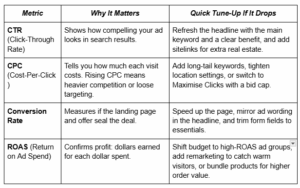
Tracking ROI: Key Metrics To Monitor in Google Ads

Google-Business-Advertising-table.

Common-Mistakes-To-Avoid-in-Google-Advertising

Common Mistakes To Avoid in Google Advertising

One of the biggest missteps is shooting from the hip on keywords.

Skip the guesswork and lean on data from tools like Google’s Keyword Planner or SEMrush to see exactly how real customers phrase their searches. 

Another pitfall is treating mobile traffic as an afterthought.

More than half of Google ad clicks now happen on mobile phones, so a landing page that loads slowly or forces users to pinch-zoom a tiny call button is money slipping through your fingers. 

Finally, Google Ads is not a “set and forget” type of thing.

You need to carve out time each week to review the search-terms report, add negative keywords, and tweak bids.

Those small, regular adjustments keep costs under control and performance heading in the right direction.


FAQs

FAQs About Google Business Advertising

How Does Google Business Advertising Work?

You bid on keywords so your ad appears above organic results. You pay only when someone clicks, and visit data tells you if that click became a lead or sale.

How Much Should I Budget for Google Ads?

Pick a figure that covers at least 100 clicks a month. For many local SMEs, that’s AU$15–40 a day. Let performance data guide increases.

How Do I Target the Right Audience With Google Ads?

Combine precise keywords with geo-targeting, ad scheduling (show during business hours), and negative terms to block irrelevant searches.

What Is a Good ROI for Google Ads?

Aim for a ROAS of 3:1 or higher—AU $3 revenue for every AU $1 spent. Niches with higher margins often push beyond 5:1.

Take-Control-of-Your-Google-Business-Advertising-Today

Take Control of Your Google Business Advertising Today

Think of Google as the world’s busiest shopping strip and your ads as the shopfront.

The right headline, compelling offer, and well-placed budget pull people through the door; constant tweaks keep them coming back. 

Set precise goals, match keywords to real-world searches, and read your metrics like a profit dashboard.

If you’d rather skip the trial-and-error phase, Ignyt can handle everything from audience research to bid strategy and landing-page fixes. 

Let’s turn those searches into steady sales. Get in touch and watch each click start paying its way.

Summary-Google-Business-Advertising-scaled-Infographic